CloudGoat Scenario Series: Vulnerable Lambda

Dedicated and hardworking DevOps aspirant who is eager to contribute skills and experience to help organizations solve real world use cases.
Introduction
CloudGoat is a series of deliberately vulnerable AWS cloud environments created by Rhino Security Labs. These scenarios are designed to simulate real-world cloud misconfigurations, where the objective is to enumerate resources, exploit security flaws, and retrieve hidden flags or secret data.
Scenario Information
Size: Small
Difficulty: Easy
Command: $ ./cloudgoat.pycreate vulnerable_lambda
Scenario Resources
1 IAM User
1 IAM Role
1 Lambda
1 Secret
Scenario Start(s)
- IAM User ‘bilbo’
Scenario Goal(s)
Find the scenario’s secret. (cg-secret-XXXXXX-XXXXXX)
Walkthrough
Initial Access
We begin by determining our AWS identity using sts get-caller-identity, the cloud equivalent of whoami
aws --profile bilbo --region us-east-1 sts get-caller-identity
We’ll name our profile as bilbo

Identifying our IAM user gives us the context we need: user ID, account, and ARN. Now, we examine bilbo’s attached policies to see what actions we can perform in this AWS environment.

Policy Enumeration and Role Assumption
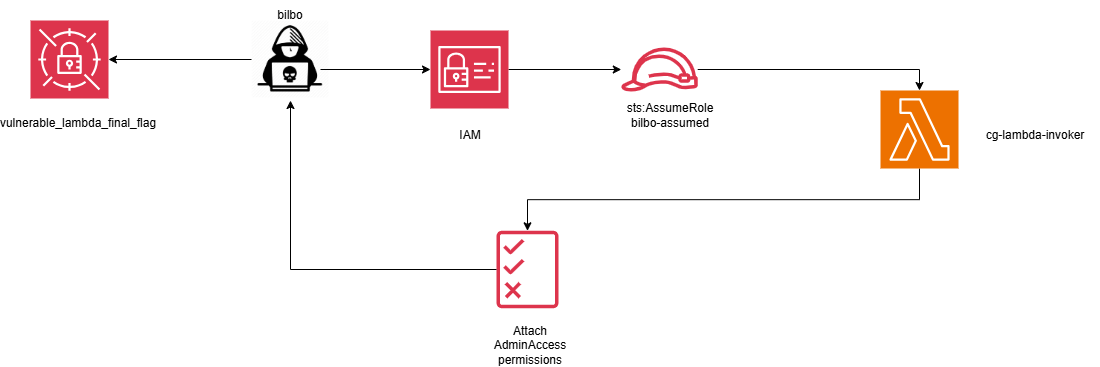
Policy enumeration reveals that the user has sts:AssumeRole permissions. This is significant, as assuming a role allows us to temporarily obtain the permissions associated with that role, potentially expanding our access.

Among the IAM roles, we notice we have AssumeRole permissions over lambda function cg-lambda-invoker. Since, the name implies it can invoke Lambda functions, this might present us a potential path for privilege escalation through role assumption.

Lambda Function Analysis
We can list the lambda functions by running:
aws lambda list-functions --profile bilbo --region us-east-1
Let us assume that role and keep the assumed role identity as bilbo-assumed. Upon listing we find there is a function named vulnerable_lambda. The vulnerable_lambda function exposes detailed metadata about its runtime, code size, last modified date, etc.

To download the Lambda function code, we extract the URL from the Code.Location field in the function’s metadata.
aws --profile bilbo-assumed --region us-east-1 lambda get-function
--function-name <function-name> --query 'Code.Location'
The function code is downloaded and saved locally as code.zip

Privilege Escalation via Lambda
Analyzing the Lambda function code exposes critical information about the database and the permissions involved. It also reveals a clear privilege escalation path, i.e., creating a custom Lambda function with a crafted payload that attaches the AdministratorAccess policy to our IAM user bilbo

We create a custom IAM policy payload that grants the function AdministratorAccess permissions.
Save the policy file as payload.json

Notice the
'--'entry in thepolicy_nameslist followingAdministratorAccess. This effectively removes all other policies attached to the IAM userbilbo.
We save and invoke the new Lambda function, which returns a 200 status code, confirming that the AdministratorAccess policy has been successfully attached to the IAM user bilbo.
aws --profile bilbo-assumed --region us-east-1 lambda invoke --function-name
<function-name> --cli-binary-format raw-in-base64-out --payload file://./payload.json out.txt

Retrieving Secrets
Let us attempt to list secrets from AWS Secrets Manager. The fact that we are able to list the secrets confirms that we have administrative privileges. We can now retrieve the secret value from vulnerable-lambda-final-flag
aws --profile bilbo --region us-east-1 list-secrets

Since we have Administrator access, we can finally get the secret value
aws --profile bilbo --region us-east-1 secretsmanager get-secret-value
--secret-id <secret-arn>

Key Takeaways
IAM Lambda execution roles must follow least privilege principle: Especially when IAM write actions are allowed, overly permissive lambda functions can lead to privilege escalation
IAM policy attachment actions: Permissions such as
iam:AttachUserPolicy,iam:PutUserPolicy, oriam:CreatePolicyVersioneffectively grant administrator-level control and should be treated as high‑risk actions.Unvalidated Lambda input becomes an attack surface: Allowing user‑controlled input to influence IAM operations enables policy injection and logic abuse, even without direct code execution.
Mitigations
Enforce least privilege on Lambda execution roles: Avoid granting
iam:*,iam:AttachUserPolicy,iam:Put*. Remove IAM write permissions from Lambda roles unless absolutely required.Explicitly Deny high-risk IAM actions using SCPs: Use Service Control Policies (SCPs) to
iam:AttachUserPolicy,iam:PutUserPolicy,iam:CreatePolicyVersion. Even if a role is misconfigured, SCPs act as a blast‑radius limiterEnable detection for IAM privilege escalation: Enable and monitor AWS CloudTrail for
AttachUserPolicyandPutUserPolicy. Enforce EventBridge rules to alert on IAM changes and GuardDuty for anomalous privilege escalation patterns.Audit IAM with automated tools like IAM access analyzer, and other cloud security tools like Prowler, Scoutsuite, Cloudfox, etc. Review who can modify IAM, not just who has admin access.